Water Rights Library
Managing legal water withdrawal allocations is useful for regulatory compliance and sustainable resource planning. The Water Rights Library allows you to define your legal limits so they can be tracked during simulation.
Accessing the Library
To access the Water Rights Library: 1. Open your project in the IAMDD workspace. 2. In the top navigation bar, click on Library. 3. Select Water Rights from the dropdown menu.
Defining a Water Right
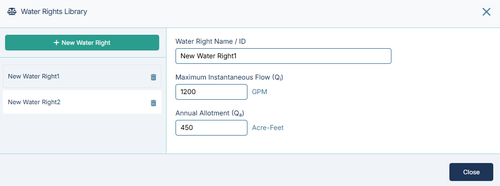
In the Water Rights library, you can define and manage multiple water rights for your project. To create a new right:
- Click the + Add Water Right button.
- Fill out the following parameters:
- Right Name: A unique, identifiable name for the legal right (e.g., "River Diversion Claim 1" or "Deep Aquifer Permit").
- Max Annual Volume: The total maximum volume of water you are legally permitted to withdraw within the operational year (typically entered in Acre-Feet or Cubic Meters, depending on your project settings).
- Max Flow Rate (optional): The peak instantaneous pumping or diversion rate allowed by the permit.
Note: Changes made in the library are automatically saved to your active project state.
Next Steps
Defining a Water Right in the library is only the first step. To actively track your usage, you must: 1. Assign the right to a physical point of diversion in your network. See Hydraulic Links & Properties for instructions on assigning rights to infrastructure. 2. Run a simulation and analyze the data. See Tracking Water Rights Compliance to learn how to visualize your cumulative withdrawals against your legal maximums.