Standpipe
The Standpipe node represents an open-to-atmosphere vessel connected inline to the pipeline. It acts as a fast-acting surge relief device, limiting transient pressure extremes by accepting or releasing flow to mitigate hydraulic shocks during rapid events like pump trips or valve closures.
Functionality in Simulations
The behavior of a Standpipe is distinct from a standard storage tank, particularly regarding how it handles the speed of the simulation:
Steady-State and EPS (Extended Period Simulation)
In EPS, the Standpipe functions as a constant-head reference point for the pipeline junction. It maintains the hydraulic grade line (HGL) at its connection point, filling or draining based on the system's mass balance, which helps establish stable starting conditions for the network.
MOC (Transient) Simulation
The Standpipe is a critical component for MOC analysis. It acts as a free-surface vessel where the water level fluctuates in response to pressure waves. As a pressure surge (water hammer) travels through the pipe and encounters the Standpipe, the vessel accepts the excess flow, rising in water level to absorb the kinetic energy of the surge. Conversely, during low-pressure events (rarefaction waves), it releases water to prevent the pipe pressure from dropping to critical levels (e.g., vapor pressure or vacuum).
UI Workflow and Configuration
To add a Standpipe to your model, click the Standpipe icon from the Surge Control section of the Component Toolbar and drag it onto the canvas.
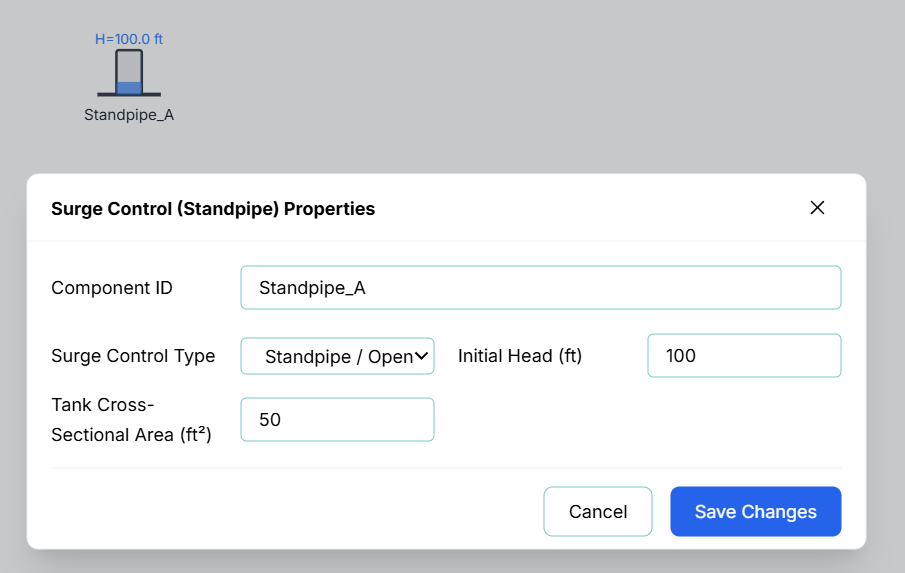
Double-click on the node or right-click the node and select Properties to configure its surge dampening characteristics.

The configuration fields include:
- Component ID: The unique identifier for this node (e.g.,
Standpipe_A). - Surge Control Type: Defines the physical configuration of the vessel. Currently, this defaults to Standpipe / Open, which assumes an open-to-atmosphere connection.
- Initial Head (ft): The starting piezometric head (water surface elevation) inside the standpipe at the beginning of the simulation (Time = 0).
- Tank Cross-Sectional Area (ft²): This is the most critical parameter for surge dampening. A smaller area allows the water level to rise and fall more quickly in response to inflow, providing "softer" dampening, while a larger area provides more storage capacity for dampening higher-volume surges.
Live Telemetry
To view a Standpipe's performance during or after a simulation, simply left-click the node on the canvas. The right-hand Telemetry Panel will populate with its high-frequency data.
The telemetry panel provides insight into the dampening effectiveness of the component:
- Instantaneous Metrics: The panel displays the real-time Surge Elevation (the current water surface height in the standpipe) and the current Pressure at the base of the standpipe.
- Dynamic Chart: The live chart plots the Surge Elevation over time. During a MOC transient simulation, this chart is vital for verifying that the standpipe is successfully mitigating pressure spikes; you should observe the water level rising and falling as the standpipe dampens the passing pressure wave, eventually settling back to the steady-state equilibrium.