Valve Node
The Valve node is an active component used to restrict flow, regulate pressure, or isolate sections of your hydraulic network.

[!NOTE] While the Valve is visually represented as a single node in the R-THYM UI for simplicity, the physics engine dynamically expands it into an upstream junction, a downstream junction, and an internal valve link before solving the hydraulics (as detailed in Appendix A).
UI Workflow and Configuration
To add a Valve to your model, click its icon in the Component Toolbar and drag it onto the canvas.

As with pumps, pay attention to the flow direction when connecting pipes: water flows from the first pipe you connect, into the second pipe.
Double-click or right-click the node and select Properties to configure it.

Valve Types
The Valve Type dropdown determines how the valve will behave during a simulation:

- PRV (Pressure Reducing Valve): Maintains a constant downstream pressure equal to the Pressure Setpoint (psi) you specify, regardless of upstream pressure fluctuations.
- PSV (Pressure Sustaining Valve): Maintains a constant upstream pressure equal to the Pressure Setpoint (psi), preventing the upstream network from draining too quickly.
- TCV (Throttle Control Valve): Modulates flow based purely on a percentage open setting.
- GPV (General Purpose Valve): Represents a valve with a specific, custom headloss-versus-flow relationship.
Closure Timing Profiles
R-THYM features advanced valve closure logic, which is critical for simulating realistic surge events (water hammer).
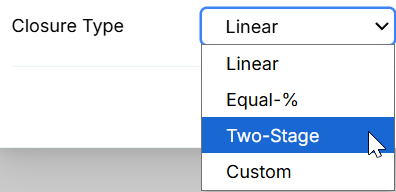
When a valve is commanded to close, it doesn't snap shut instantly. The properties available for configuration change dynamically depending on the selected Closure Type:
- Linear: The valve area reduces at a constant, steady rate. Requires a total Stroke Time (sec).

- Equal-%: The standard for most control valves, where equal increments of valve travel produce equal percentage changes in the existing flow coefficient ($C_v$). Requires a total Stroke Time (sec) and a Step Interval (s) (which determines the resolution of the discrete time steps generated to approximate the continuous exponential curve).

- Two-Stage: Closes rapidly during the first stage to cut the bulk of the flow, then closes slowly during the second stage to minimize the final water hammer spike. You specify the Transition Point (%) where the first stage ends, the Stage 1 Time (s), and the Stage 2 Time (s).

- Custom: Allows you to define an explicit time-versus-position table. You enter rows specifying the Time Offset (s) from the start of the closure command and the corresponding % Open at that time.
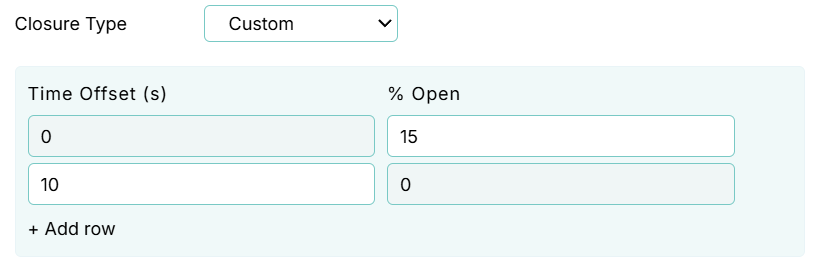
Real-Time Interaction
Just like the Pump, you can manually interact with the Valve while the simulation is actively running.

Clicking the small indicator dot on the top right corner of the Valve's node icon acts as a quick manual toggle switch, allowing you to trigger a full Open or Close command in real-time (which will then execute according to your defined Closure Profile).

Additionally, an interactive slider appears above the valve icon during the simulation. You can click and drag this slider to manually throttle the valve's open percentage on the fly, instantly altering the minor loss coefficient and throttling the flow through the network.
Live Telemetry
Left-clicking a Valve on the canvas reveals its performance data in the right-hand Telemetry Panel.
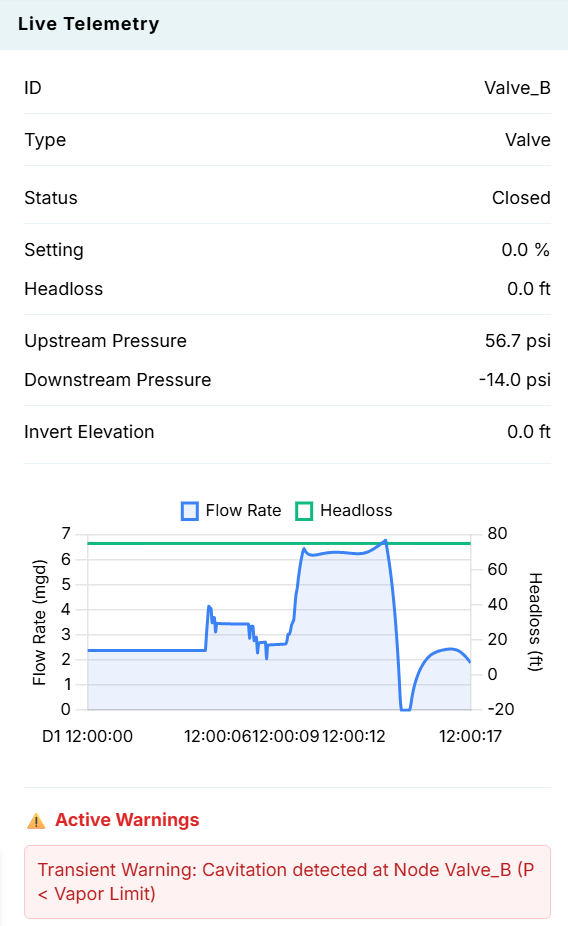
The panel is split into the following sections:
- Instantaneous Metrics: Displays real-time values for the valve's Status, Setting (%), Headloss (ft), Upstream Pressure, Downstream Pressure, and Invert Elevation.
- Hydraulic Chart (Flow Rate & Headloss): Dynamically plots the flow rate (e.g., mgd or gpm) and the headloss across the valve over time.
- Active Warnings: If the simulation encounters extreme physical conditions—such as the massive negative pressure transient shown in the screenshot (-14.0 psi) caused by slamming the valve shut too quickly—a red Transient Warning for Cavitation will appear at the bottom of the panel. This is a critical feature for identifying destructive water hammer events!